When a machine stops, know who did what, and when.
Bakım7/24 is a maintenance management system (CMMS) for factories. Operators report breakdowns from the machine's QR code, technicians close work on their phones, and preventive plans turn into work orders on their own. Machine manufacturers run service for the machines they sell from the same system.
- No installation, runs in the browser
- 30 days free, no card
- Servers in Türkiye
- Turkish and English interface
How it works
From breakdown to close-out in three steps
Operators, technicians and the maintenance manager see the same record; nobody writes it on paper or in a chat group.
Scan the QR
The operator scans the QR code on the machine. Its card, history and open work appear.
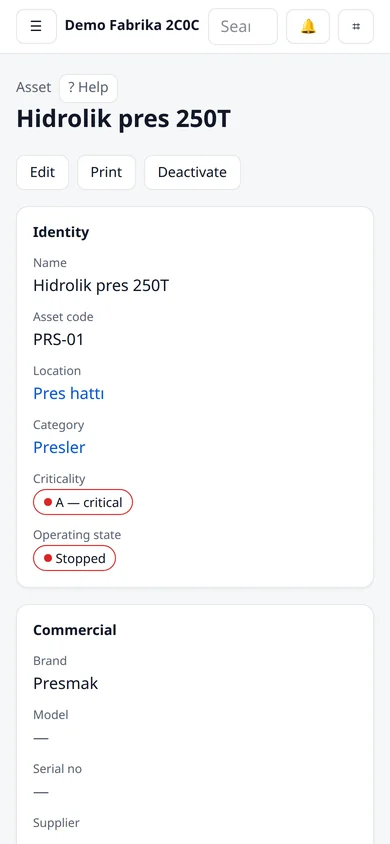
Machine card opened by QR · sample data Report the breakdown
Problem, symptom, is the machine stopped, is there a safety risk. Priority and owner are set automatically.
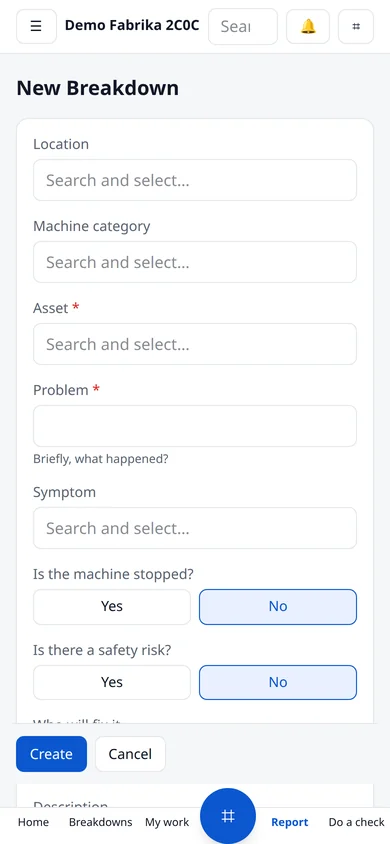
Reporting a breakdown on the phone · sample data The technician closes it
The job lands on the phone. Start, issue parts, write the fix, close.
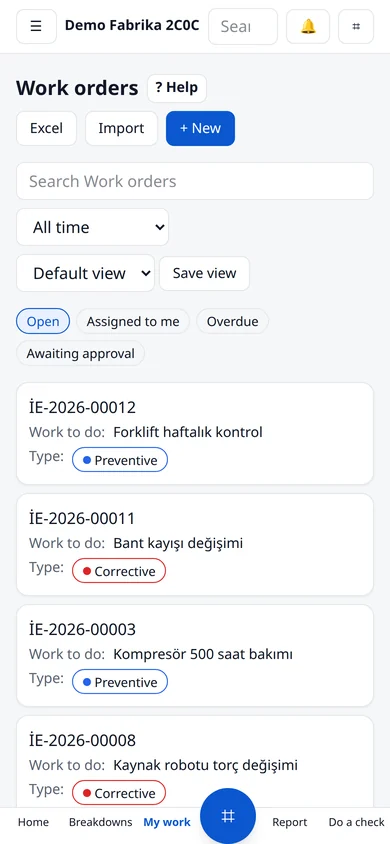
A technician's work list · sample data
Screens
Real screens, sample data
These screenshots come from the demo account on the live system. You can open the same screens without signing up.
Home
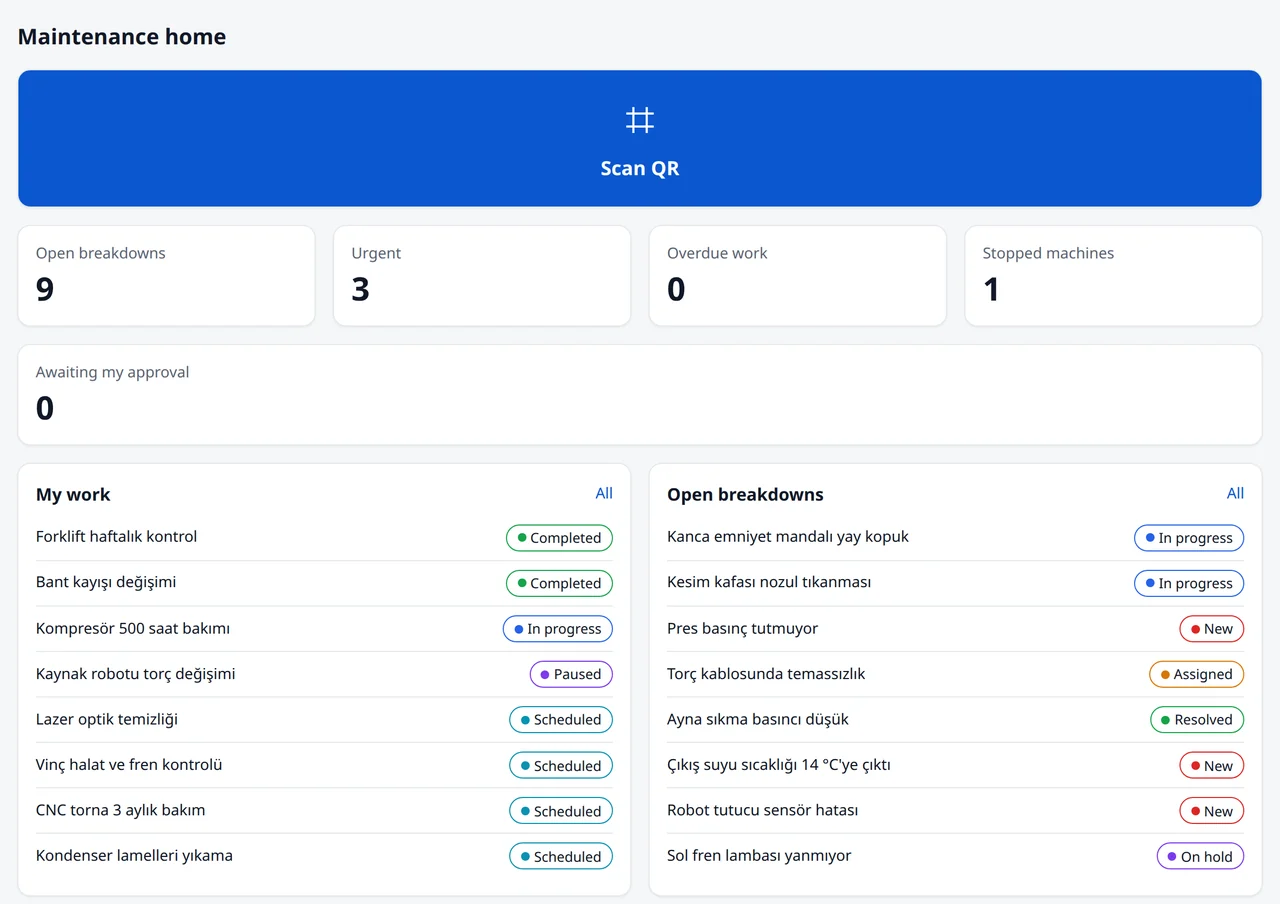
The whole picture at first glance
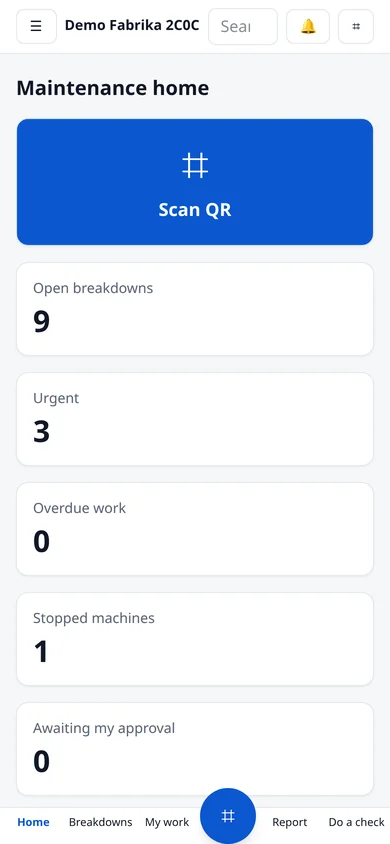
Open breakdowns, urgent and overdue work and stopped machines on the home screen, with each person's own jobs and open breakdowns below.
- Every role gets its own home screen
- Everything awaiting approval in one place
- Morning digest by e-mail too
Breakdowns
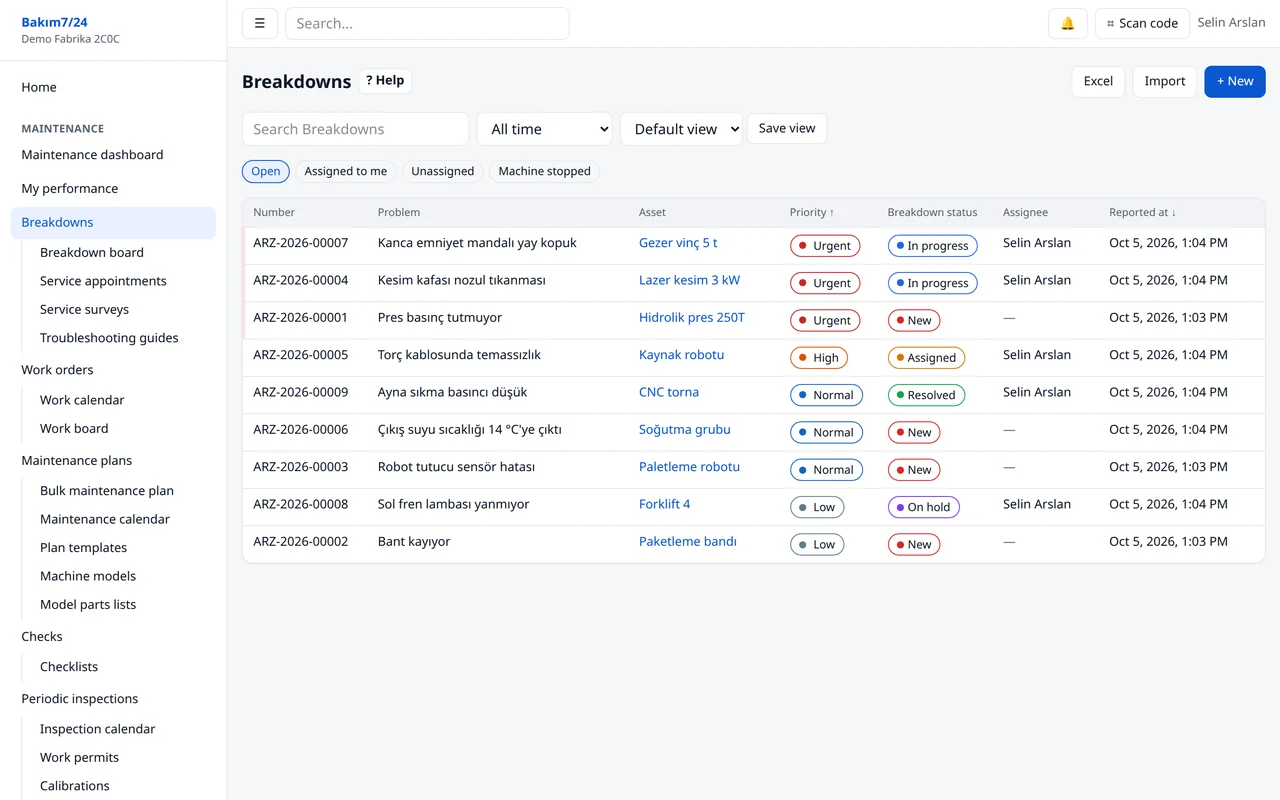
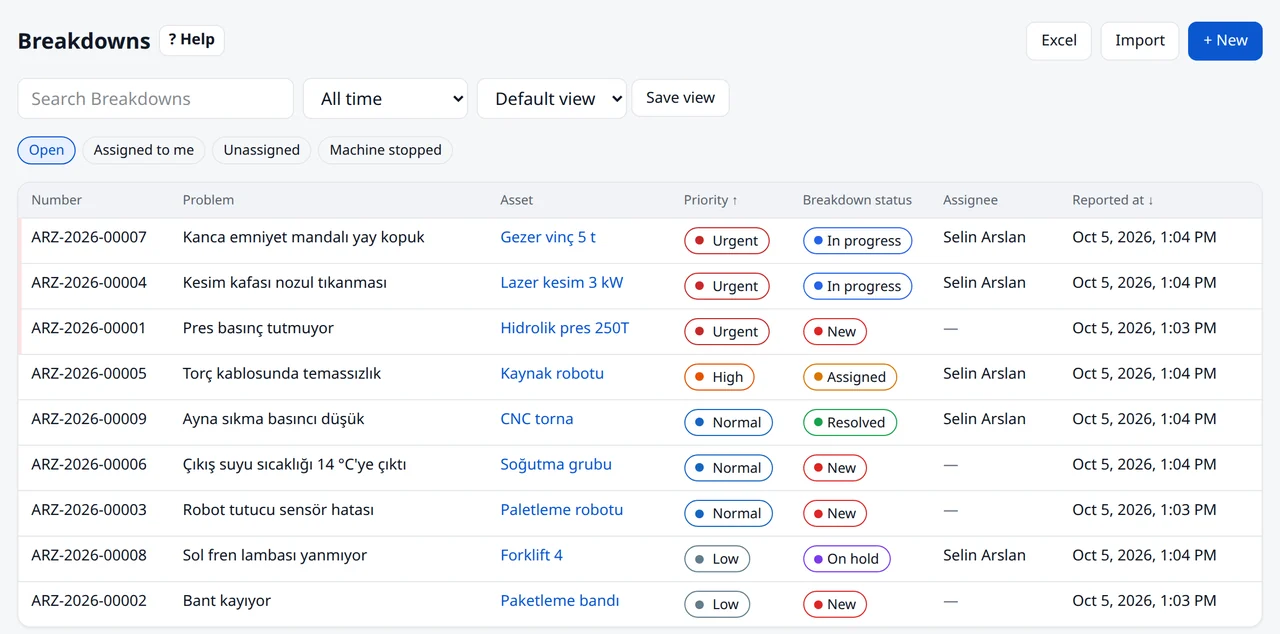
Every open breakdown in one list
Priority, status and owner at a glance. Filters persist: “Assigned to me”, “Machine stopped”.
- Priority from machine criticality, stoppage and safety risk
- Auto-assignment to the area owner or on-call technician
- Downtime and hourly downtime cost
Work orders
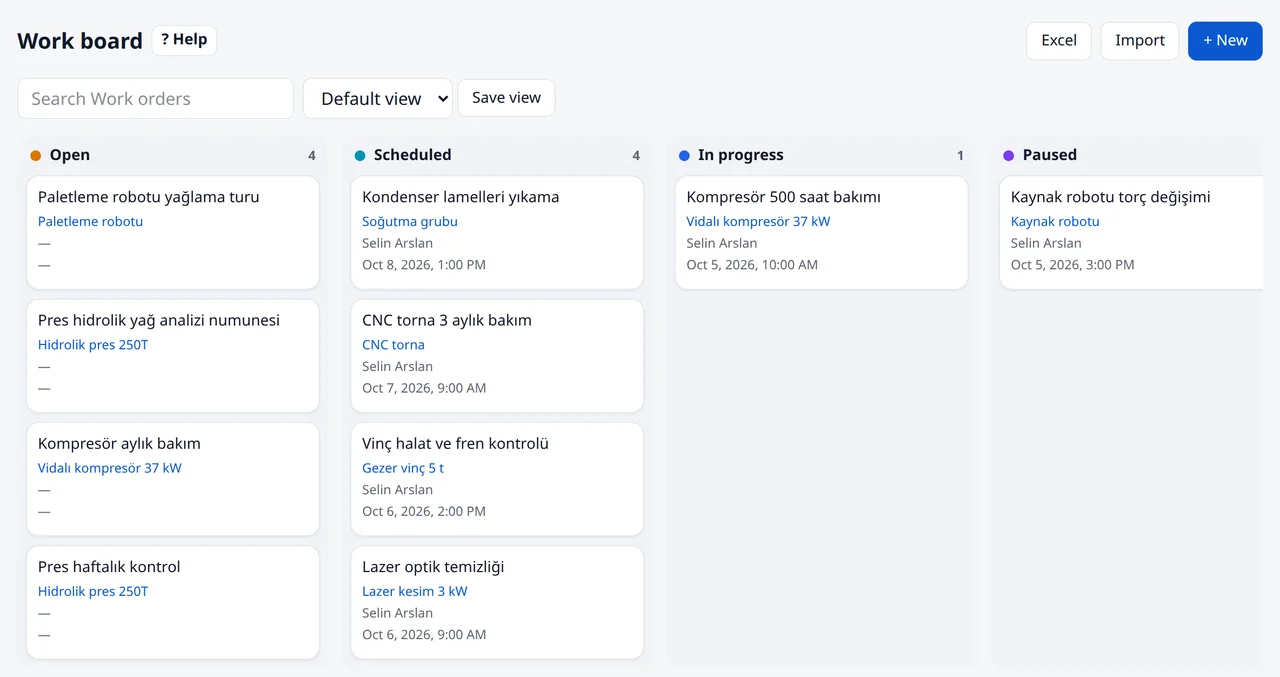
Who is on what, on the board
Open, scheduled, in progress, paused. Each card shows the machine, owner and planned date; drag a card to change its status.
- Drag-and-drop work board
- Open jobs and estimated time per person
- Parts used, signature and PDF service report at close-out
Calendar
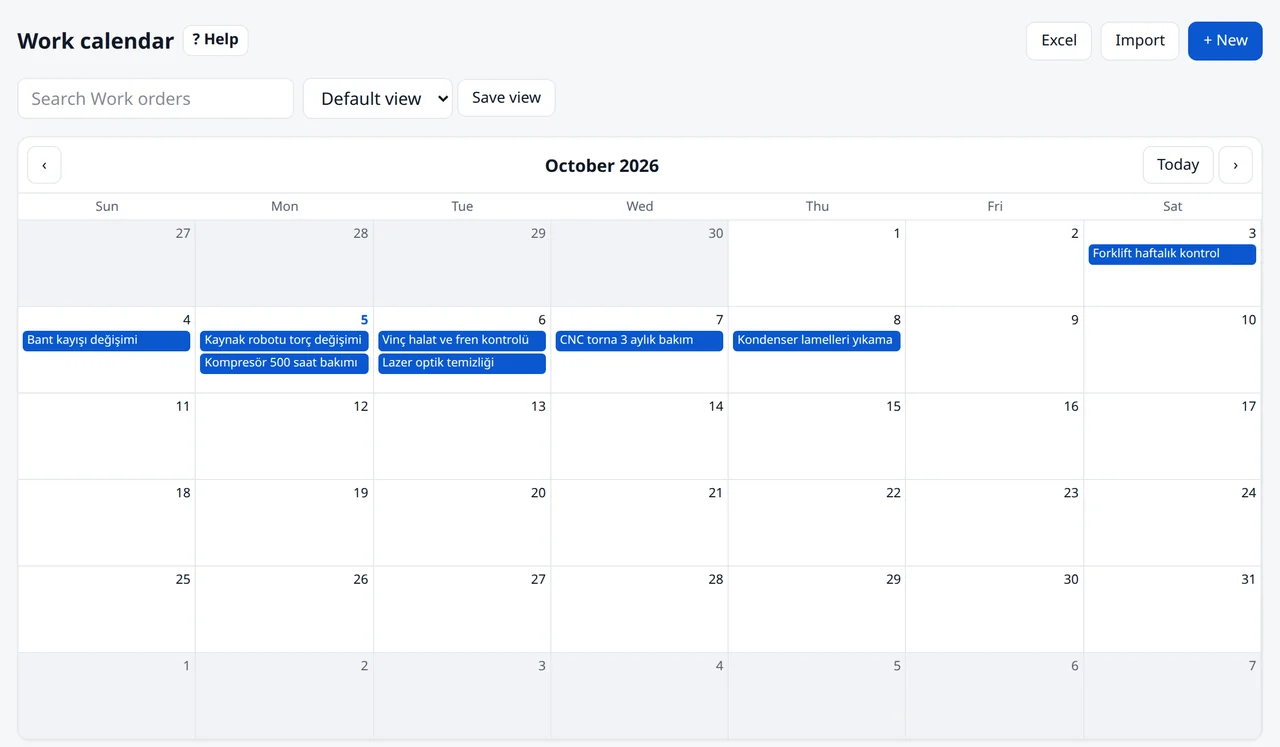
Planned work on the calendar
Preventive and breakdown jobs share the same calendar and board. Drag to reschedule; who does what is always clear.
- Plans by days, running hours or meter thresholds
- Calendar that respects closed days, shifts and seasons
- Escalation for overdue work
A real night shift
One breakdown, start to finish
The record of a press that stopped on the night shift. The system keeps every step; nobody writes anything down twice.
- ReportOperator Can scans the press's QR code: “Press is losing pressure.” He adds a photo and marks the machine as stopped.
- AssignmentThe press is class A and stopped, so priority is urgent. The on-call technician Alex gets a notification.
- ResponseAlex starts the job. The machine card shows the same symptom was fixed two months ago by replacing a seal.
- FixThe seal is issued from stock and the breakdown is resolved. Downtime: 35 minutes, costed from the hourly downtime rate.
- ReportThe maintenance manager sees the night's events and the low seal stock in the morning digest.
Modules
Eleven connected modules
Breakdowns feed work orders, work orders feed inventory, inventory feeds purchasing; all of it feeds reporting. Turn on what you need.
Breakdown management
Anyone who scans the QR code on a machine can report a breakdown. Priority and owner are set automatically and the right person is notified.
Work orders
Open, planned, in-progress and completed work as a list, board or calendar.
Preventive maintenance
Plans follow days, running hours or meter thresholds. Work orders open automatically when due.
Machines and locations
Site, building, line and machine tree. Each machine card holds its history, documents and condition.
Inventory and purchasing
Spare-part stock, movements and purchase approval. You hear about a critical part before it runs out.
Meters and device data
Running hours, cycles, temperature, vibration, energy. Read manually, by QR, from a photo or straight from the device.
Reports
MTTR, MTBF, availability, PM compliance and cost. Every role sees its own dashboard.
Team, shifts, permissions
Start with ready roles. Everyone sees only their own work and the sites they look after.
Phone and offline
Installs on the phone without an app store. Records offline and syncs when the connection is back.
AI helpers
Output is always a draft. Nothing is saved until you approve it.
No-code configuration
Fields, forms, status flows, menus and notifications change from the screen. Your process stays yours.
Machine manufacturers
Your machines stay with you in the field
Give your customers your own maintenance system. Machines arrive with their maintenance plans, breakdowns reach you as service tickets, spare parts are ordered from the machine card.
- Catalogue tree
- Family, series, model
- Customer accounts
- Open an account for each customer; company, service package, contract period and responsible team on one card
- Machine handover
- A machine you sell lands in the customer's system with its plans, documents and QR code
- Service tickets
- Customer breakdowns reach you as service tickets
- Service bulletins
- A recall or improvement bulletin opens a work order on every affected machine; completion is tracked
- Spare parts
- Price lists, customer prices, quotes, orders and shipments
Security
Your data stays yours
- Isolation
- Each account's data is separated with row-level security.
- Sign-in
- Two-factor authentication; single sign-on with Microsoft or Google.
- Backups
- Encrypted every night, restore-tested every week.
- Hosting
- Servers in Türkiye, encrypted connections.
- Privacy
- Download my data, delete my account, record anonymisation.
Questions
Frequently asked
What is Bakım7/24?
A cloud maintenance management system (CMMS) for factory maintenance teams and machine manufacturers. Breakdown reporting, work orders, preventive maintenance, checklists, spare-part inventory, reporting and manufacturers' customer service run in one system.
Do I need to install anything?
No. It runs in the browser and installs on phones like an app. Your account opens when you sign up; start with an industry template or sample data if you like.
Is there a free trial?
Yes, 30 days, no credit card. When it ends, pick a package to continue. Without payment your data is kept and the account is locked.
Does it work without internet?
Yes. The phone app records offline and sends everything when the connection returns.
Where is my data and is it safe?
Data is stored on our servers in Türkiye, transmitted over encrypted connections, backed up nightly with encryption and restore-tested every week. Each account's data is isolated at database level. Two-factor authentication and enterprise single sign-on (SSO) are supported.
Try it free for 30 days.
No credit card. Open your account, look around with sample data or add your own machines.