For factories
One list for the maintenance team, one dashboard for managers
For every factory that maintains its own machines, from a single workshop to a multi-site group. No manufacturer connection needed.
01
Everyone sees their own work
Start with ready roles. Each person sees only the records of the sites and locations they look after.
- Maintenance manager
- Dashboard, workload, cost, PM compliance; alerts for overdue work
- Supervisor and technician
- Assigned work, morning digest, checklists and parts issue on the phone
- Operator
- QR breakdown reports and daily checks; nothing else to learn
- Plant and production manager
- Downtime, availability, weekly summary
- HSE specialist
- Statutory inspections, work permits, certificate expiries
- Stores and purchasing
- Stock, counts, critical parts, purchase requests and approval
02
The first week
- Open the accountStart with an industry template (food, metal, plastics, textile) or from scratch.
- Add machinesBuild the location tree, import machines from Excel, print QR labels.
- Invite the teamAdd people in bulk from an e-mail list and assign roles.
- Set up plansPlans and checklists from templates; the first work orders open on their own.
03
The operator's only job: scan
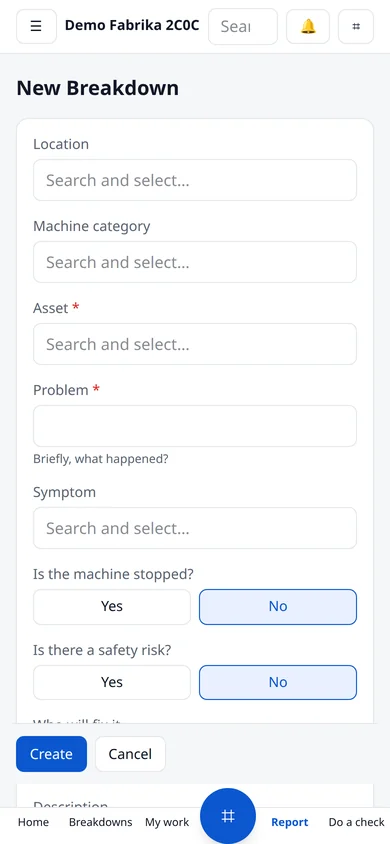
No training needed to report a breakdown. Whoever scans the machine's QR code types the problem, adds a photo and sends it, optionally without signing in.
- Priority and safety risk set automatically
- Assigned to the area owner or on-call technician
- Downtime starts if the machine stopped
04
Modules used in the plant
Breakdown management
Anyone who scans the QR code on a machine can report a breakdown. Priority and owner are set automatically and the right person is notified.
Work orders
Open, planned, in-progress and completed work as a list, board or calendar.
Preventive maintenance
Plans follow days, running hours or meter thresholds. Work orders open automatically when due.
Machines and locations
Site, building, line and machine tree. Each machine card holds its history, documents and condition.
Inventory and purchasing
Spare-part stock, movements and purchase approval. You hear about a critical part before it runs out.
Meters and device data
Running hours, cycles, temperature, vibration, energy. Read manually, by QR, from a photo or straight from the device.
Reports
MTTR, MTBF, availability, PM compliance and cost. Every role sees its own dashboard.
Team, shifts, permissions
Start with ready roles. Everyone sees only their own work and the sites they look after.
Phone and offline
Installs on the phone without an app store. Records offline and syncs when the connection is back.
AI helpers
Output is always a draft. Nothing is saved until you approve it.
No-code configuration
Fields, forms, status flows, menus and notifications change from the screen. Your process stays yours.
Try it free for 30 days.
No credit card. Open your account, look around with sample data or add your own machines.